

Quick Answer
Repurposing video content is re-editing footage to maximize its value. Common ways to re-edit footage includes adjusting the length, aspect ratio, pace, visual style, and much more. It’s a potentially high-ROI move that can help you reach more of your potential audience. However, repurposing video isn’t as simple as trimming a long video down to 30 seconds and calling it a day. Format, context, and platform behavior all matter.
Why Would You Want to Repurpose Video Content?
This is likely not news to you, but video is where all eyeballs are right now. For example, users on YouTube, the most popular social media site in the USA, watch over 1 billion hours of video content daily. Newer platforms like TikTok are also extremely popular. Users spend about 95 minutes per day on TikTok, higher than comparable social media platforms.
However, there’s a practical problem: video is expensive to produce. Most of these platforms reward constant, consistent uploads. Even internal communications or employee training can require a lot of video content be made. With that in mind, hiring a production agency, using a freelancer, or building an internal video team to push out a high volume of videos can eat up time and resources. About 26% of marketers say that a lack of time is their biggest barrier to video production. When you invest real resources into a piece of content, publishing it once on a single channel and moving on isn’t just inefficient. It’s leaving serious value on the table.
Repurposing can help with that. A single well-produced webinar, product demo, or interview can find new life on TikTok, LinkedIn, YouTube, and more. The footage already exists. You’re just giving it a longer shelf life and a wider reach. Plus, it’s cheaper to re-edit an existing video rather than producing an entirely new one.
Beyond maximizing your spend, there’s a strategic advantage here too. Different people on your target audience consume content in different ways and on different platforms. A decision-maker might watch your 20-minute product demo on your website, while someone earlier in the buying process might first encounter your brand through a 45-second clip on LinkedIn. Repurposing lets you meet both of them where they are.
What Kind of Video Content Can Be Repurposed?
Not all video content is easy to repurpose. A good rule of thumb is that the more structured the original content, the more flexibility you have when repurposing it. Here’s a practical breakdown:
| Content Type | Repurposing Ease | Why |
|---|---|---|
| Webinars and presentations | High | Clear structure, logical sections, natural breakpoints |
| Panel discussions and interviews | High-Medium | Identifiable topics per speaker, quotable moments |
| Product demos and explainer videos | Medium | Message is focused, but context matters |
| Event recap / brand story videos | Medium-Low | Narrative flow can be hard to break apart |
| Casual vlogs or stream-of-consciousness recordings | Low | Lack of structure makes clipping harder |
Structured content like webinars, training videos, and interviews tends to repurpose well because the ideas are organized logically. You can pull a self-contained segment on pricing objections from a sales webinar, for example, and it stands on its own as a short clip without much context. Meanwhile, a casual walk-and-talk video that meanders through several topics is much harder to clip into something coherent unless the person speaking is very sharp and precise.
There’s one other important distinction worth making: repurposing is not the same as reposting. Cross-posting the same video to multiple platforms without changes is quick and easy, but it’s not repurposing. Real repurposing means adapting the content for the format, audience expectations, and platform norms of wherever it’s going next.
What You Need to Think About Before Repurposing
Before you start clipping and reformatting, a few things are worth thinking through:
Does the content hold up?
Evergreen content (content that isn’t time-sensitive) repurposes best. A video about how to run a productive team meeting will be just as useful in 18 months. A video about a product feature you’ve since retired will not.
Who’s watching, and where?
There’s no point publishing a repurposed TikTok-style clip if your audience is largely watching content on LinkedIn or checking their email. Match the repurposed format to where your audience actually spends time.
What’s the goal of the new piece?
A top-of-funnel social clip wants to grab attention and stop the scroll. A mid-funnel email embed wants to explain a product benefit clearly. The same source video might fuel both, but you’ll edit and frame them very differently.
Do you have the rights to everything in the original video?
This one catches people off guard. If your original video used licensed music or stock footage that was licensed only for one specific use case or platform, you’ll need to check whether that license extends to your repurposed version.
Why “Just Make It Shorter” Isn’t Always the Answer
This is where a lot of teams run into trouble. It sounds simple enough: take your 45-minute webinar, cut it to 60 seconds, post it to Instagram Reels, get engagement. That’s it, right? Not quite.
Context is always going to be a big issue. A moment that lands perfectly at minute 32 of a webinar can lose its punch when it’s pulled out of sequence. The setup is gone. The viewer didn’t hear the question that was asked three minutes earlier. The punchline or insight that felt earned in the original now feels abrupt or confusing.
On top of that, short-form platforms have their own rules. TikTok, Instagram Reels, and YouTube Shorts aren’t just shorter versions of YouTube. They have distinct audience expectations, algorithm behaviors, and viewing habits. On these platforms, viewers make a keep-or-scroll decision within the first two to three seconds. That means a great clip isn’t just a short clip. It’s a clip that opens with an immediate hook, delivers a single clear idea, and doesn’t rely on anything that came before it for context.
Aspect ratio is another practical hurdle. A talking-head interview shot in 16:9 landscape for YouTube will look awkward on a 9:16 vertical platform unless you reframe it, and simply cropping to vertical often cuts off half the frame in a distracting way.
The short version: repurposing long video into short-form content is a legitimate strategy, but it requires actual editorial thinking, not just trimming.
How Visla Helps You Repurpose Video Content
This is where Visla does a lot of the work for you. It’s built as an end-to-end video production platform, and several of its core features map directly onto the repurposing workflow.
AI Summary
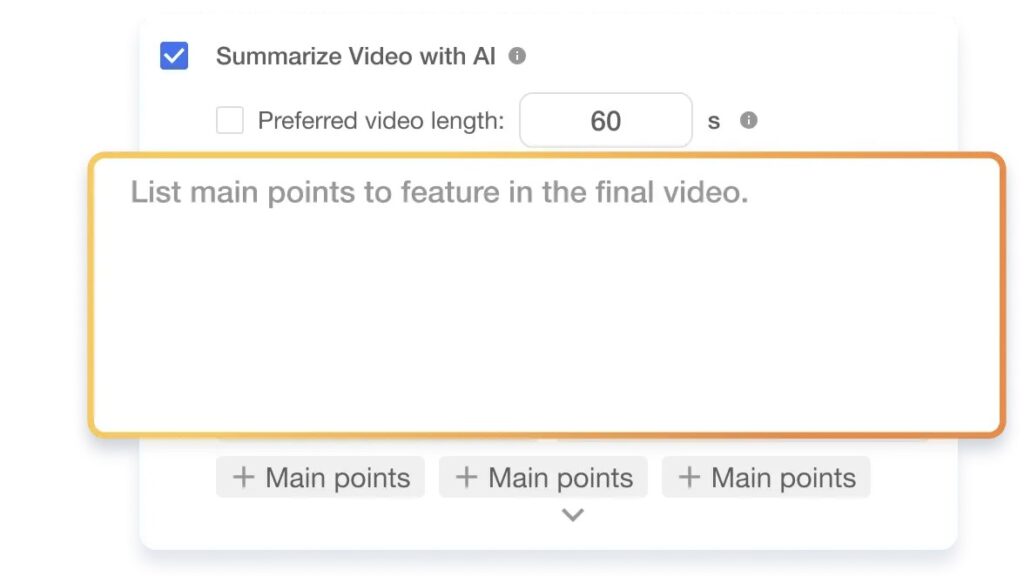
Visla’s AI Summary tool lets you generate a condensed version of any video in seconds. You set the target length, optionally guide the AI with prompts, or choose from its own topic suggestions. The output is a trimmed, coherent summary of your source video. Rather than manually scrubbing through a recording looking for the best 90 seconds, you’re letting the AI identify the strongest material and assemble it for you. This is especially useful for pulling usable clips from webinars, demos, or interview recordings.
Aspect ratio control
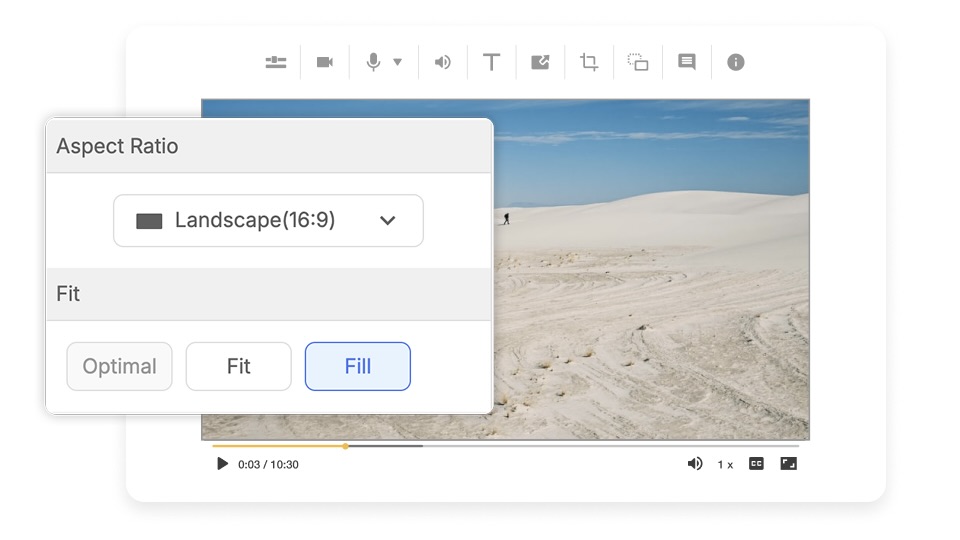
When you’re taking a finished video and adapting it for a new platform, Visla lets you change the aspect ratio directly within the editor. Going from a landscape 16:9 video to a vertical 9:1 format for Reels or Shorts is something you can do without exporting and reimporting into a separate tool. This keeps your repurposing workflow in one place instead of bouncing between applications.
Private Stock
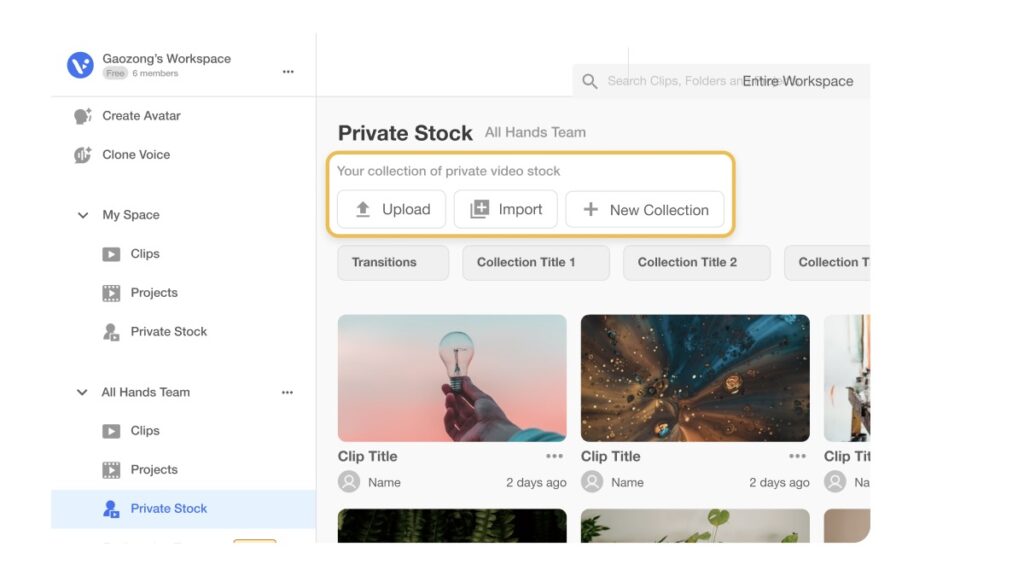
If you’ve got raw footage sitting on a hard drive somewhere (b-roll from a shoot, outtakes, extra interview material), Visla’s Private Stock feature turns that into a usable asset library. You upload your footage, and Visla’s AI automatically tags it with relevant descriptions so it’s searchable and organized. Then, when you’re building future videos, the AI can pull from your Private Stock library to recommend the right clips. This is very valuable for teams that shoot more than they publish. That extra footage doesn’t have to be wasted. It can become the building blocks of future repurposed content without requiring you to remember where anything is.
Taken together, these features mean you’re not just repurposing content faster. You’re building a system where the footage you’ve already invested in keeps working for you across future projects.
FAQ
It depends on the length and structure of the original, but a well-produced 45-to-60-minute webinar can realistically yield 10 to 20 distinct content assets. That might include 5 to 8 short social clips, a written blog post derived from the transcript, a few pull-quote graphics for LinkedIn, an email with an embedded video highlight, and a condensed summary video for YouTube. The key is planning for repurposing before you hit record, since content with clear section breaks and standalone talking points gives you far more to work with than a loosely structured recording.
Repurposing video content does not typically create SEO problems, because the platforms involved (YouTube, TikTok, Instagram, LinkedIn) are treated as separate domains by search engines like Google, so the same core material appearing in multiple places doesn’t trigger duplicate content penalties. Where you do need to be careful is on your own website: if you’re embedding repurposed video clips on multiple blog posts with identical or near-identical surrounding copy, that’s where thin-content issues can arise. The safest approach is to write original, contextually relevant copy around every video embed you publish on your own domain, so each page has independent value for search. Repurposed video can actually improve your SEO when it drives backlinks, increases time-on-page, and boosts engagement signals across platforms where your content lives.
Platform norms have shifted as short-form content has matured, and getting the length right is one of the most important variables in repurposing decisions. For TikTok and Instagram Reels, videos between 30 and 90 seconds tend to perform best for brand content, though TikTok now supports videos up to 10 minutes for creators looking to experiment with longer formats. YouTube Shorts performs well at under 60 seconds, while standard YouTube videos intended for search and education benefit from being at least 7 to 10 minutes long to signal depth to the algorithm. LinkedIn video posts hit their sweet spot around 1 to 2 minutes for organic reach, though native document and text posts still compete strongly on that platform, so video there works best when it delivers a clear, concise business insight quickly.
Absolutely, and for many teams this is where repurposing delivers some of its highest ROI, since it lets a single video asset feed multiple entirely different content channels. A video transcript can become the backbone of a long-form blog post, a series of social media text posts, or even a downloadable guide; the research and expertise in the video don’t have to stay locked in video form. Audio extracted from an interview or webinar recording can be published as a podcast episode with minimal additional production work, giving you a presence on platforms like Spotify and Apple Podcasts without a separate recording workflow. If your team produces a lot of video, building a process that systematically converts recordings into written and audio assets is one of the most scalable content strategies available, especially for B2B brands where buyers consume content across many formats before making a purchase decision.
The best clips tend to share a few common traits: they open with an immediately graspable idea, they don’t rely on earlier context to make sense, and they deliver a clear takeaway within the first 10 to 15 seconds. When reviewing a long recording, look for moments where the speaker makes a bold or counterintuitive claim, answers a question that your audience is actively searching for, or explains something complex in a surprisingly simple way, since those moments tend to perform well as standalone short-form content. High audience engagement points in your analytics (re-watches, comments, or timestamps where viewers stopped and rewound) are reliable signals that a section resonated and is worth extracting. AI-powered tools like Visla’s AI Summary can scan a video and surface the strongest moments automatically, which is especially useful when you’re working with long recordings and don’t want to watch every minute of footage manually.

May Horiuchi
May is a Content Specialist and AI Expert for Visla. She is an in-house expert on anything Visla and loves testing out different AI tools to figure out which ones are actually helpful and useful for content creators, businesses, and organizations.