
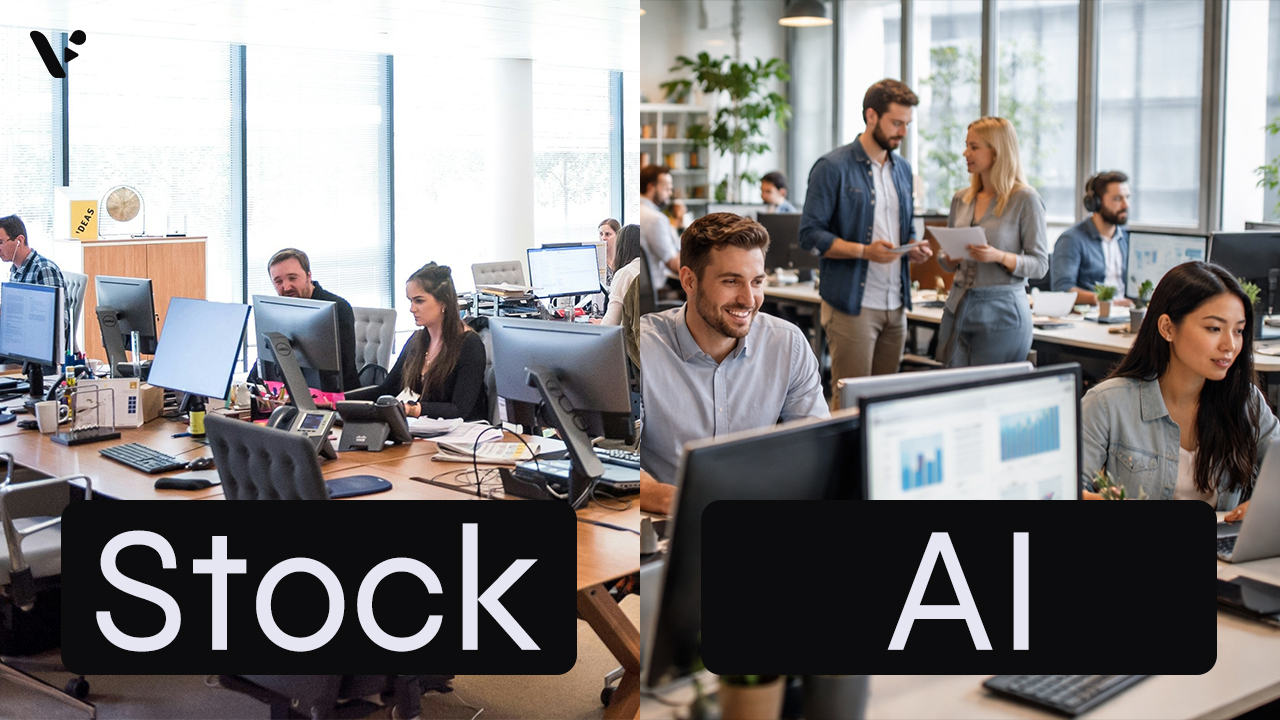
Quick Answer: AI-generated video clips vs stock footage
AI-generated video clips give you custom visuals on demand, while stock footage gives you real-world footage with predictable realism and licensing terms. For common scenes like office conversations, city flyovers, transit movement, and laptop-in-a-cafe b-roll, stock wins on instant believability and AI wins on specificity, brand fit, and speed to something unique. The best approach usually mixes both: you use stock for broad, “this is a real place” shots and AI clips for moments where you need the exact people, props, environment, or vibe. If you need the absolute highest realism and you can afford the time and budget, a bespoke shoot still sets the ceiling, but AI clips often hit the best cost-to-output ratio for teams that need to scale.
The 3 choices: AI-generated clips, stock footage, and bespoke shoots
When people say “AI clips vs stock footage,” they usually mean “generated clips vs licensed clips,” but teams actually choose between three lanes:
- AI-generated clips: You generate new footage from prompts and creative “ingredients” (characters, objects, environments), then iterate until it matches your brief.
- Stock footage: You license footage that already exists, then edit it into your video.
- Bespoke footage: You plan, shoot, and edit original footage with a video team, either internal or external.
Most marketing and business videos land in the middle lane mix: you combine AI-generated clips and stock footage, then you reserve bespoke shoots for hero moments, product launches, and campaigns where you need real people, real products, and perfect control.
Clip-by-clip comparison: AI-generated video clips vs stock footage
Office conversation: AI-generated business clips vs stock footage
This is classic “explainer video” b-roll. You can use it for voiceovers, product intros, customer stories, and internal comms.
Stock footage usually wins when you need instant realism. You can find a clean, well-lit office conversation shot by professionals, with natural micro-expressions, believable hand movement, and real depth of field.
AI-generated clips win when you need the scene to be about your company, not “a company.” Yes, the generated clip above is “generic,” but you can easily refine and customize it to look however you want it to. Swap out characters, change the office environment, add your company logos, and whatever else you can think of.
Where AI shines in this clip type
- You can match your brand tone (warm and approachable vs sleek and corporate).
- You can specify who the people are (role, age range, vibe, attire) instead of taking what you can find.
- You can keep the same characters across multiple scenes, so the video feels like one coherent story.
Where AI can still miss
- Hands, eye contact, and subtle human timing can look off.
- “Business conversation” can drift into uncanny performance if you’re not careful.
Practical tip: If you need a quick, safe opener, use stock for the first establishing seconds, then cut to AI clips for the more specific moments (for example, your exact product on the desk, your exact office environment, or a character who reappears later).
City footage: AI-generated aerial clip vs stock drone footage
This is the easiest stock clip in the world to use and the hardest AI clip to get “quietly perfect.”
Stock footage wins for recognizable, accurate reality. If your audience needs to instantly recognize New York, London, or Tokyo, stock footage gives you real landmarks, real lighting, and real atmospheric haze. For example, the above stock clip is of New York City, and it’s immediately recognizable.
AI-generated clips win when you want a city shot that doesn’t exist. Yes, Veo 3.1 is attempting to generate a drone shot over Central Park in New York City, but a local can probably tell that some details are off. Even if you’ve never been to NYC, you can probably tell that several buildings are repeated with minor variations across the skyline. AI captures the vibe of the city, but not the specifics.
Where AI shines in this clip type
- You can generate a flyover that matches your exact mood and weather.
- You can create stylized city visuals that feel cinematic without needing drone permits.
- You can avoid the “same skyline everyone uses” effect.
Where AI can still miss
- Building geometry can warp, especially during motion.
- Traffic and tiny moving elements can behave oddly.
- If you need a real city, AI can drift into “close but not correct,” which creates credibility issues.
Practical tip: If the city itself matters, use stock. If the city is just a vibe, AI clips can give you something more on-brand.
Laptop in a cafe: AI-generated lifestyle b-roll vs stock footage
This is the modern “knowledge worker” b-roll staple, and it’s also where stock footage can feel the most generic.
Stock footage wins on realism, lighting, and subtle behavior. Coffee steam, hand movement, and ambient motion look correct without you doing anything.
AI-generated clips win on specificity and brand fit. You can specify the exact vibe: cozy neighborhood cafe, bright minimalist coffee bar, late-night laptop grind, or quiet morning work session. You can also design the environment to match your brand, then reuse it across a series.
Where AI shines in this clip type
- You can match your target audience more precisely.
- You can avoid cliché visuals (overly staged smiles, the same latte art, the same laptop angles).
- You can include specific objects that matter to your story.
Where AI can still miss
- Fingers on keyboards can look off.
- Small details like cup reflections, screen glare, and micro-movements can drift.
Practical tip: If you’re making a series, AI clips can help you build a reusable “signature cafe” environment. If you’re making a one-off video and you just need quick b-roll, stock footage stays hard to beat.
Pros and cons: AI-generated video clips and stock footage
Here’s the simple version, without pretending one option wins everywhere.
| Category | AI-generated clips | Stock footage |
|---|---|---|
| Best for | Bespoke visuals, brand worlds, recurring characters, hard-to-find scenes | Realism, recognizable places, natural human motion, predictable quality |
| Biggest advantage | Specificity and control | Believability and breadth |
| Biggest downside | Occasional motion and physics weirdness, iteration required | Generic feel, non-specificity, “everyone has seen this” risk |
| Time profile | Fast to start, then iterative | Fast to find when it exists, slow when you’re picky |
| Brand fit | High when you reuse ingredients and style | Medium unless you curate heavily |
| Risk profile | Creative risk (does this look real enough?) | Licensing and sameness risk (does this feel overused?) |
Decision framework: when to use AI-generated video, stock, or bespoke
When you’re staring at an empty timeline, you want rules you can actually follow.
Use stock footage when
- The shot needs to feel like documentary reality.
- Your audience needs to recognize a real location or real event.
- The shot includes complex motion: crowds, transit, sports, or lots of interacting objects.
- You need something usable in minutes and you don’t need it to be specific.
Use AI-generated video clips when
- You need the scene to match your exact brand, product, or audience.
- You want the same characters, objects, or environments across multiple scenes.
- You can’t find the stock clip you actually want, or you can’t license it cleanly.
- You want to iterate on camera angle, mood, and composition without reshooting.
Choose bespoke footage when
- You need your real product, real team, or real customers on camera.
- You need total realism and you can’t compromise.
- The video anchors a major moment: launch, keynote, flagship campaign.
A quick “good default” for business videos
If you want a steady, scalable workflow, try this split:
- Stock for establishing shots and motion-heavy b-roll (cities, transit, crowds).
- AI clips for anything that should feel unique to your brand world (characters, props, environments).
- Bespoke for hero moments (product-in-hand, customer proof, founder messaging).
How Visla AI Director Mode helps you generate consistent AI video clips
The hard part isn’t choosing AI or stock. The hard part is mixing them without your video feeling like a collage.
AI Director Mode helps you treat AI-generated video clips like real production assets. You can define reusable ingredients (characters, objects, environments), then generate scenes in a consistent style so the video feels like one world, not a random collection of clips. When you want speed, you can generate your scenes automatically from a storyboard. When you want control, you can generate scene-by-scene and fine-tune the result using three approaches: prompt-to-video for pure creative direction, ingredient-to-video when you want your reusable elements on screen, and frame-to-video when you want to steer composition and continuity.
Once you have a draft, scene-based editing keeps the workflow clean. You can swap a generated clip for stock footage (or the other way around) without rebuilding your entire video, because you work one scene at a time. That matters when you need to compare options quickly and choose the clip that sells the idea best.

May Horiuchi
May is a Content Specialist and AI Expert for Visla. She is an in-house expert on anything Visla and loves testing out different AI tools to figure out which ones are actually helpful and useful for content creators, businesses, and organizations.