
Quick answer
Video SOPs are standard operating procedures turned into clear, reusable training videos. They help L&D teams explain repeatable processes through visual steps, narration, captions, and examples employees can revisit anytime. They’re especially useful for onboarding, compliance training, workplace safety, software workflows, manager training, and role-specific procedures. With Visla, teams can record real workflows, generate scenario-based SOP videos, edit by scene, and share approved training content from one workspace.
Training is essential, common, and expensive
Corporate training
The rising cost of workplace learning
Key benchmarks from ATD & Training Magazine’s 2025 industry reports
Annual training budgets by company size
Top 3 training content areas
Most organizations don’t need to be convinced that training matters. The harder question is how to deliver consistent training without making every new process, policy, or role change feel like a new production project.
The cost pressure is real. According to ATD’s 2025 State of the Industry report, organizations averaged 13.7 formal learning hours used per employee in 2024, and the average cost per learning hour used reached $165, up 34% from the year before. ATD also found that the three most common training content areas were new-employee orientation, mandatory and compliance training, and managerial and supervisory training.
That matters for L&D teams because those common training categories line up closely with SOPs. New hires need to learn repeatable workflows. Compliance training needs consistent messaging. Managers need repeatable processes for reviews, escalations, approvals, and documentation. If teams keep delivering those lessons live or rebuilding them from scratch, training costs can climb quickly.
Training Magazine’s 2025 Training Industry Report tells the same story from a budget perspective. U.S. training expenditures rose to $102.8 billion in 2025, and companies spent an average of $874 per learner, up from $774 the year before. Average annual training budgets ranged from $333,305 for small companies to $1.6 million for midsize companies and $11.7 million for large companies. The same report found that 41% of respondents named lack of resources or personnel as their biggest training challenge.
That’s where video SOPs help. They don’t make training free, and they shouldn’t replace coaching, practice, or human support. But they do turn repeatable instruction into reusable assets, which helps L&D teams protect quality while reducing repeated manual effort.
What is an SOP?
An SOP, or standard operating procedure, is a documented set of instructions for completing a repeatable process. It explains what needs to happen, who’s responsible, what order the steps should follow, and what good execution looks like.
SOPs are often associated with compliance-heavy industries, but they’re useful almost anywhere people need to do the same task consistently. That includes onboarding a new employee, handling a support ticket, submitting an internal request, using equipment, following a safety checklist, updating a customer account, or completing a software workflow.
The EPA’s guidance on preparing SOPs frames SOPs as part of a quality system. That’s a useful way for L&D teams to think about them, too. SOPs aren’t just documents. They’re a way to preserve process knowledge, reduce variation, and make training more consistent.
What is a video SOP?
A video SOP is a visual, step-by-step version of a standard operating procedure. Instead of relying only on text, screenshots, or live shadowing, a video SOP shows the learner how to complete a process.
For L&D teams, that changes the training experience. A written SOP can tell someone what to do, but a video SOP can show what the task actually looks like. That’s especially valuable when learners need to see a sequence, a screen, a decision point, a physical setup, or a safe way to perform a task.
A good video SOP usually includes a clear title, a short purpose statement, step-by-step visuals, captions or subtitles, callouts for important details, and a simple way for learners to find or rewatch it later.
Why are video SOPs useful for L&D teams?
Video SOPs are useful because many workplace tasks are learned visually. Employees often need to see where to click, what to check, what to avoid, and what the finished process should look like.
They also help L&D teams protect consistency. In live training, one manager may explain a process one way while another explains it differently. In peer shadowing, important details can get skipped. In long written documents, learners may skim past the most important step. A video SOP gives every learner the same baseline explanation.
There’s also a cost argument. If the same onboarding workflow, safety procedure, or software task comes up every month, every new live explanation adds cost. Video SOPs don’t eliminate manager support or hands-on practice, but they reduce the amount of time spent repeating basic instructions. That lets L&D teams reserve live time for questions, feedback, and role-specific nuance.
The timing is right for this shift. Training Magazine found that mandatory or compliance training is already commonly delivered online, with 92% of organizations doing at least some of it online and 45% doing it entirely online. IT and systems training, desktop application training, management training, customer service training, and onboarding also commonly include online delivery. For many SOP topics, video isn’t a leap into something unfamiliar. It’s a better format for training work that’s already becoming more digital.
Video SOP examples for L&D teams
The best video SOP topics are repeated often, easy to demonstrate visually, and expensive to explain again and again. For L&D teams, the best first targets are usually processes with high volume, high risk, or high support burden.
New-hire onboarding is a natural place to start. If every cohort needs to learn the same HR systems, security setup, communication norms, benefits process, or internal tools, record those workflows once and update them when the process changes.
Compliance and safety training are also strong candidates. OSHA’s training resources explain that OSHA provides information on employer training requirements and resources such as publications, videos, and other assistance. OSHA also maintains a video library organized by topic, including falls, respiratory protection, warehousing, healthcare, construction hazards, and recordkeeping. A company still needs to follow the rules that apply to its industry, location, and workforce, but video can support clearer communication for safety-sensitive procedures.
Software workflows are another high-value area. A process like filing an expense report, updating a CRM record, approving a request, or completing a customer handoff is often hard to explain in text. A screen-recorded SOP can show each click, field, and decision point, which makes the process easier to follow and easier to standardize.
Manager training is also a strong fit. Not every manager skill can be reduced to a SOP, but many recurring manager processes can. Think performance review steps, incident documentation, time-off approvals, coaching checklists, interview debrief workflows, or escalation procedures.
What makes a good video SOP?
A useful video SOP is focused, structured, and easy to maintain. It shouldn’t try to replace an entire training program in one long video. It should help someone complete one specific process correctly.
Start by choosing one process per video. “How to submit an expense report” is better than “Everything you need to know about finance workflows.” “How to put on required PPE before entering the lab” is better than “Complete workplace safety overview.” Smaller videos are easier to watch, search, update, and reuse.
Next, script the steps before production. You don’t need a cinematic script, but you do need a clean sequence. A simple format works well: purpose, audience, required materials, steps, common mistakes, and where to go for help.
Add visual emphasis where learners are likely to miss something. Use callouts, captions, zooms, arrows, or short pauses to highlight required fields, safety checks, approval points, or exceptions. If a step is risky, compliance-sensitive, or often misunderstood, don’t rush past it.
Finally, define ownership. Every video SOP should have an owner, a review date, and a source document or checklist behind it. That keeps the video from becoming a polished but outdated training asset.
How to create a video SOP with Visla
There are two practical ways to create video SOPs in Visla, depending on the process you’re documenting. Use Screen Step Recorder when you need to capture a real digital workflow. Use AI Director Mode when you need to create a scenario-based SOP that would be hard, expensive, or unsafe to film.
How to make a workflow video SOP with Visla Screen Step Recorder
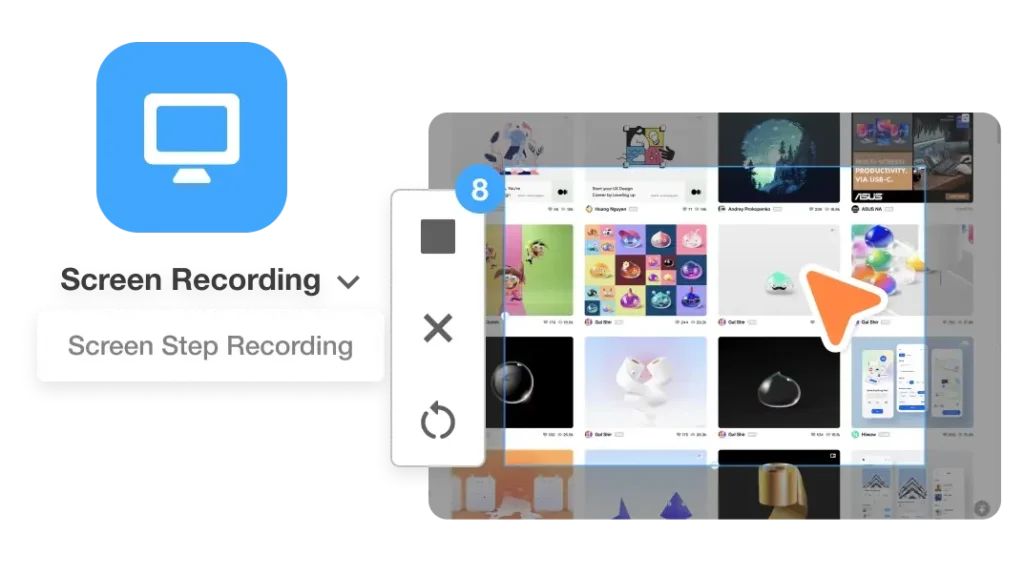
Use Visla’s Screen Step Recorder for software walkthroughs, internal tools, HR systems, help desk steps, customer support processes, product walkthroughs, and onboarding tasks.
- Choose one workflow that employees repeat often or ask about frequently.
- Open the workflow in a clean demo account or with safe sample data.
- Start Screen Step Recorder before you begin the task.
- Complete the workflow at a natural pace and avoid unrelated clicks.
- Let Visla turn the recording into a structured step-by-step video guide.
- Review each step for accuracy, clarity, and missing context.
- Add short annotations for required fields, common mistakes, and decision points.
- Remove detours, pauses, and steps that don’t help the learner complete the task.
- Share the draft with the process owner or subject matter expert for review.
- Publish the approved video SOP in the right Workspace or Teamspace.
This workflow is cost-effective because it starts with work your team already does. You’re not staging a shoot or building every visual from scratch. You’re capturing the process once, then turning it into training content that can be reused.
How to make a scenario-based video SOP with Visla AI Director Mode
Use AI Director Mode for workplace safety videos, compliance examples, role-based training, equipment procedures, and environment-specific walkthroughs.
- Start with an approved checklist, SOP document, script, or rough procedure.
- Define the learner, the setting, and the process outcome before generating scenes.
- Choose the visual style that fits the training topic and audience.
- Create or select the characters, objects, and environments the SOP needs.
- Generate the AI storyboard from the procedure or script.
- Review the storyboard before creating motion or final clips.
- Check that every step appears in the correct order.
- Lock in consistent characters, equipment, locations, and brand assets.
- Generate AI video clips only for the scenes that need it.
- Use scene-based editing to fix one scene without rebuilding the whole video.
- Send the draft to L&D, compliance, safety, or operations reviewers.
- Publish the approved version and record the next review date.
This approach helps reduce cost because teams don’t have to coordinate a physical shoot for every safety scenario or location variation. They can create role-specific or site-specific versions by adjusting the storyboard, setting, or steps instead of starting from zero.
How to lower video SOP production costs without lowering quality
The goal isn’t to make cheap training. It’s to make high-quality training more repeatable.
Start by prioritizing SOPs with the clearest return. Good candidates include tasks that new hires ask about often, processes that create support tickets, safety procedures that need regular refreshers, and workflows where mistakes create rework. If a process is repeated across many learners, it’s a strong candidate for video.
Use existing materials first. Don’t start from a blank page if you already have a checklist, policy, help article, slide deck, or SME notes. Convert those into a video outline, then use Visla to record or generate the visual version.
Build modularly. A five-part onboarding library is often better than one 35-minute onboarding video. Modular SOPs make it easier to update one process when something changes. They also make it easier for learners to find the exact answer they need.
Standardize your format. Use the same structure across SOP videos: what this covers, who it’s for, what to prepare, steps, common mistakes, and next steps. Reusing a format saves production time and gives learners a familiar experience.
Keep review close to the work. L&D should own the training experience, but subject matter experts, compliance leads, managers, or operations teams should review the actual procedure. With Visla Workspaces, teams can create, edit, share, manage, and approve video projects in one place, which helps reduce scattered feedback and version confusion.
Track what needs updating. Create a review calendar for your highest-impact SOPs. Review safety and compliance content whenever regulations, equipment, or internal policies change. Review software SOPs when the user interface changes. Review onboarding SOPs whenever employee feedback shows that a step is unclear.
Video SOP FAQ
A SOP is the documented procedure, while a video SOP shows the procedure visually. The best video SOPs usually start from a written SOP, checklist, or approved process document.
A video SOP should be as short as the process allows, and most teams should keep each video focused on one task. If a process takes more than a few minutes to explain, split it into smaller modules.
Video SOPs can support compliance training by making procedures clearer and more consistent. However, teams should still confirm the exact documentation, delivery, testing, and recordkeeping requirements that apply to their industry and workforce.
L&D teams should review video SOPs whenever the process, policy, software interface, equipment, or regulation changes. For high-impact SOPs, set a recurring review cycle so outdated videos don’t keep circulating.
Every video SOP should include the process name, audience, purpose, prerequisites, steps, common mistakes, owner, and review date. It should also include captions or subtitles so employees can follow the procedure in more contexts.

May Horiuchi
May is a Content Specialist and AI Expert for Visla. She is an in-house expert on anything Visla and loves testing out different AI tools to figure out which ones are actually helpful and useful for content creators, businesses, and organizations.