
Quick Answer: Visla vs. Katalist
Both Visla and Katalist use AI-generated storyboards to help you go from an idea to a finished video, but they’re built with different types of users in mind. Katalist is aimed at filmmakers, social media creators, and smaller ad agencies who want granular, shot-level control over their video projects. Visla is an all-in-one B2B video production platform where AI Director Mode is one powerful part of a broader, powerful workflow. For larger business or enterprise teams that need polished, branded video at scale, Visla is the more complete solution.
AI video tools are multiplying fast, and the confusion around which one is actually worth your time and budget is multiplying with them. If you’ve been researching these tools, you’ve probably come across Visla and Katalist. They’re similar enough to land in the same conversations, but different enough that picking the wrong one could mean a lot of wasted time and money. We tested both tools hands-on to give you a clear picture about which one you should choose.
What Is Visla?

Visla is an all-in-one AI video production platform built for business teams. It assists with the entire video production process: recording, creating, editing, branding, collaborating, and sharing. Its brand-new flagship AI workflow, AI Director Mode, builds a storyboard with AI that you can review and edit before generating a single frame of video. You lock in characters, objects, environments, and brand assets, approve the storyboard, and then selectively turn scenes into AI video clips. The result is video that feels intentional and produced rather than randomly generated.
What Is Katalist?
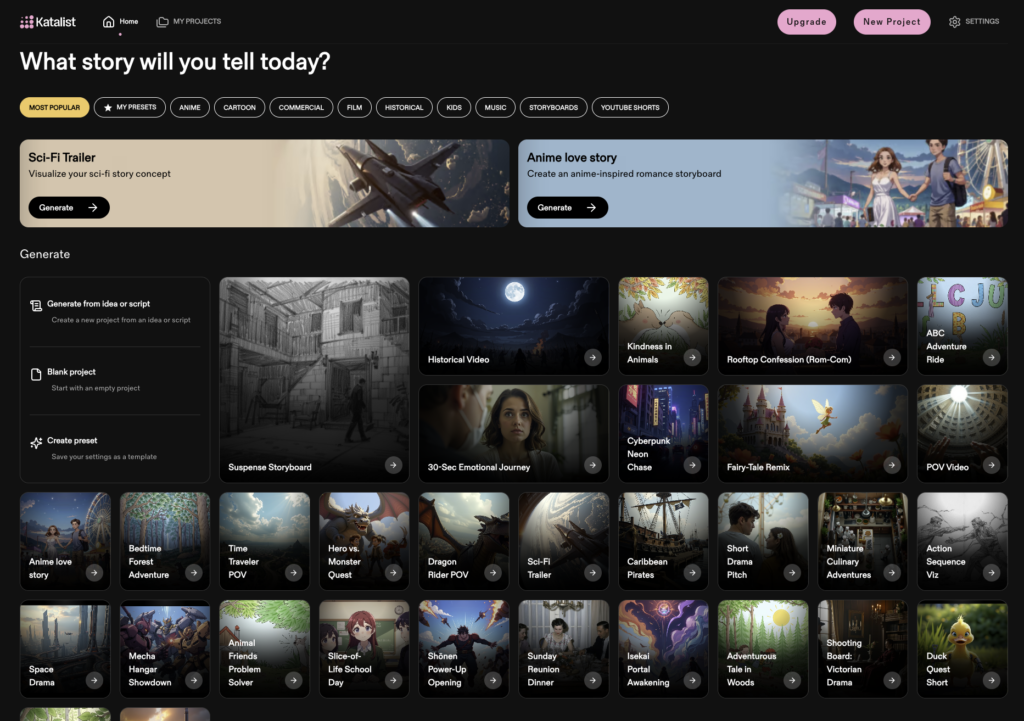
Katalist is an AI storyboarding and video creation platform designed primarily for individual creators, filmmakers, advertisers, and YouTubers. You upload a script (as a CSV, Word doc, PowerPoint, or pasted text), and Katalist’s AI breaks it down into frames, automatically identifies and generates characters, and creates a visual storyboard. From there, you can refine scenes and camera angles, then convert the storyboard into a video complete with voiceover, music, and sound effects.
First Impressions: User Experience and Interface
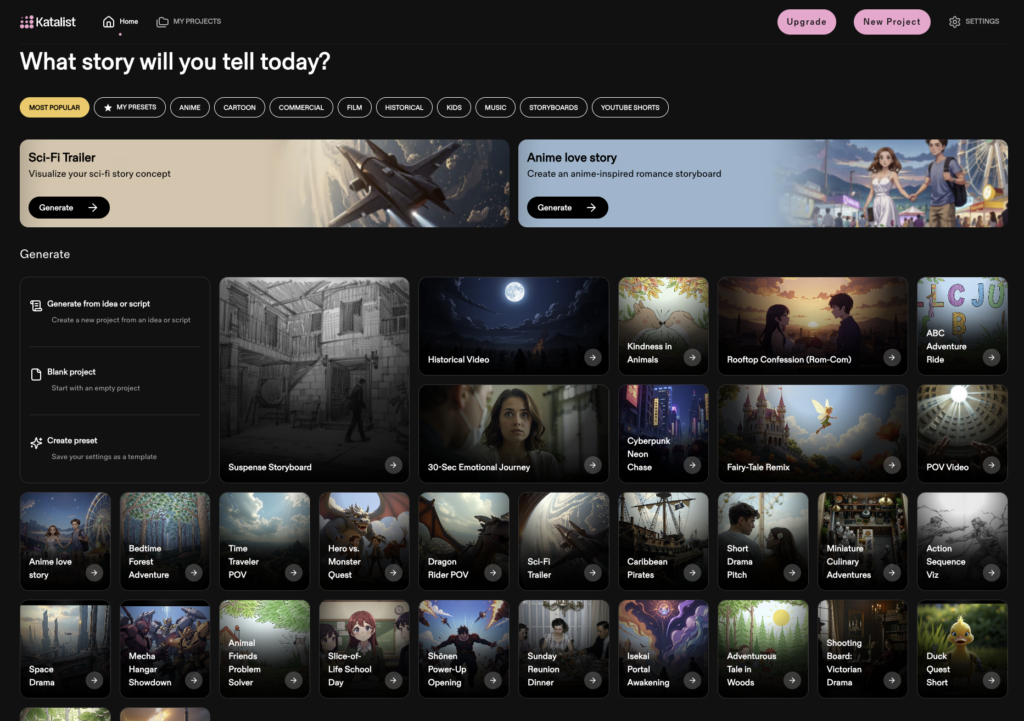

When you open Katalist, you’re greeted with a grid of template options: Sci-Fi Trailer, Anime Love Story, Cyberpunk Neon Chase, Dragon Rider POV, Fairy-Tale Remix, and dozens more. Category filters across the top let you browse by Anime, Cartoon, Film, Historical, Kids, Music, and YouTube Shorts. The visual variety is impressive, and it does make clear how much the platform can do.
But honestly? It’s overwhelming. The core actions I’d expect to be front and center, “Generate from idea or script,” “Blank project,” and “Create preset,” are listed in small text in a sidebar on the left. Meanwhile, the two large, brightly colored panels dominating the screen are for a Sci-Fi Trailer and an Anime Love Story. If you’re a business user who just wants to make a product demo or a training video, that framing immediately signals that the platform isn’t quite built with you in mind.
Visla has a learning curve too. It’s a feature-rich platform and you’ll want to work through the onboarding guides or tutorials to get comfortable with everything. But once you’re in, the workflow logic makes sense: your workspace and brand settings anchor everything, and the tools connect outward from there. It doesn’t feel like a creative toy. It feels like a complete production system.
The Core Feature: Storyboard-First Video Creation
Visla AI Director Mode
AI Director Mode lets you start with any input: an idea, a script, a URL, a PDF/PPT raw footage, images, or audio. Then, you can set the visual style (anything from cinematic to corporate to whiteboard), pacing, voiceover, characters, objects, and environments. Once you’ve set everything up to your liking, the AI will take over and generate a storyboard for you, complete with high-quality AI-generated images to give you an idea of what each scene will be like. Finally, you choose which scenes to turn into full AI video clips and which to leave as storyboard images, so you’re only spending credits where it makes sense.
At roughly 8,500 credits per minute of generated video, AI Director Mode isn’t cheap. But the output quality reflects that investment. Characters, objects, and environments stay locked across scenes in a way that eliminates the visual drift and mid-video “actor swapping” that plagues generic AI video tools. The result feels polished and professional.
Katalist’s Storyboard Workflow
Katalist’s workflow is also genuinely well-thought-out for its intended audience. When I uploaded a script for a short 15-second ad, I liked how the platform automatically added camera directions like OTS and MCU to each scene. That’s a nice touch for anyone with a filmmaking background.
However, there’s currently no way to tell Katalist NOT to reprocess your script. If you’ve already written your own camera directions and scene descriptions, the platform overrides them anyway, and you’re left editing everything back manually. That friction adds up quickly.
Katalist’s Cast feature, which auto-generates characters from your script, is also inconsistent. Sometimes it works cleanly; other times it produces nothing from the exact same input, and there’s no apparent explanation for why. There’s also no way to add or delete characters from the Cast page, which limits how much control you actually have over the one thing Katalist markets most heavily. The storyboard image previews themselves are noticeably low resolution, which makes it hard to confidently approve scenes before committing to video generation.
Audio: Voiceover, Music, and Sound
This is one of the clearest gaps between the two platforms. Katalist’s auto-narration feature produces a choppy, robotic-sounding voiceover, and the platform doesn’t appear to include a stock music library for background audio. For anything you’d want to share professionally, that’s a meaningful limitation.
Visla’s audio capabilities are genuinely strong. The AI voices are high quality to begin with, and you can go further: create a custom voice clone or generate a new voice entirely from a text prompt describing the characteristics you want. Visla also includes a large licensed music library to choose from, so you’re not stuck with silence or robotic narration. If you want to add an AI Avatar to present your video, that’s available too.
Brand Consistency, Stock Footage, and Enterprise Features
Katalist doesn’t have a brand kit feature. There’s no way to lock in your logo, colors, or product visuals at the account level so they carry through every video. For a solo filmmaker making narrative content, that probably doesn’t matter. For a marketing team producing 30 product videos a quarter, it’s a real problem.
Visla lets you set up brand kits at the Workspace level, so every team member starts from the same brand foundation. You also have access to a massive stock footage library from Getty Images and Storyblocks (16 million-plus clips at the Enterprise tier), meaning that if you don’t want AI-generated visuals for a particular scene, you don’t have to use them. Katalist has no comparable stock library.
On the enterprise side, Visla offers SSO, SOC 2 Type II compliance, a dedicated account manager, onboarding and training support, and custom usage limits. Katalist doesn’t publicly document equivalent security credentials, which matters when you’re evaluating tools for a larger organization.
Pricing Comparison
| Visla | Katalist | |
|---|---|---|
| Free plan | $0 (2,000 credits/month, ongoing) | Limited (50 one-time credits) |
| Pro / Entry paid plan | From $9/month | From ~$29/month |
| Business / Team plan | From $39/month | ~$399/month |
| Enterprise | Custom | Custom |
Visla’s free plan is meaningfully more useful: 2,000 credits every month with no expiration versus Katalist’s 50 one-time credits. Visla’s entry point is also lower at every tier, and the jump in Katalist’s team pricing is significant. At ~$399/month for a business team, Katalist is considerably more expensive than Visla’s Business plan at $39/month.
Bottom Line: Who Should Use Which?
Katalist is worth considering if you’re a filmmaker, YouTuber, or solo creator who wants deep shot-level control over a cinematic storyboard. The multi-model video generation is a genuinely useful feature for creative experimentation, and the platform’s pre-production sensibility is well-suited to narrative and entertainment content.
Visla is the better fit if you’re making video for a business: marketing content, product demos, training videos, sales enablement, or customer communications. AI Director Mode gives you the storyboard-first workflow, but with the brand consistency, audio quality, stock footage access, and enterprise infrastructure to actually deploy video at scale. The features are powerful and the learning curve is real, but the ceiling is also a lot higher.
FAQ
An AI storyboard generator, like Katalist, focuses on translating a script into visual frames so you can plan and visualize a video before producing it. A full AI video production platform, like Visla, covers the entire workflow from storyboarding and scripting all the way through editing, audio, branding, and publishing in one connected system. The practical difference is that a storyboard tool is typically a pre-production aid, while a full platform is where you actually finish and deploy the video. For business teams producing video at scale, the distinction matters: you don’t want to build your storyboard in one tool and then rebuild the whole project in another just to get a shareable final cut.
Katalist is a capable creative tool for filmmakers, content creators, and ad agencies who want deep shot-level control over a narrative storyboard, but it has some meaningful gaps for business use. It doesn’t include a brand kit feature, which means there’s no way to lock in your logo, color palette, or product visuals at the account level so they carry consistently across every video your team produces. Its team pricing also jumps sharply, with the Business plan sitting at roughly $399 per month, which is considerably higher than competitors like Visla that offer comparable team functionality starting at $39 per month. If your use case is primarily cinematic storytelling or creative pitching, Katalist is worth evaluating, but for marketing, training, and sales enablement content that needs to feel on-brand every time, it’s not the most complete solution available.
For enterprise teams that need more than a storyboarding workflow, the strongest alternatives to Katalist in 2026 include Visla, Synthesia, and LTX Studio, each with a different emphasis. Visla is the best fit for teams that want an end-to-end production platform with AI Director Mode, voice cloning, AI Avatars, a large licensed stock footage library, and enterprise security features like SSO and SOC 2 Type II compliance. Synthesia is worth considering for organizations primarily producing avatar-led training, onboarding, or internal communications content, since it supports over 140 languages and integrates with leading AI video generation models like Sora and Veo. LTX Studio is a strong option for production teams that want character-consistent video with a collaborative, director-focused workflow and deep storyboard-to-video tooling.
Audio quality is one of the most underrated differentiators between AI video platforms, because a polished visual paired with a robotic voiceover immediately undercuts the professionalism of the final product. The best AI video tools in 2026 offer more than basic text-to-speech: you’ll want to look for high-fidelity AI voices, the option to create custom voice clones from a real recording, and a library of licensed background music so your videos feel complete without requiring a separate audio workflow. Some platforms, like Visla, go further by letting you generate a custom voice from a text description alone, which is useful when you want a specific tone or style without needing to record it yourself. Katalist’s current auto-narration feature produces noticeably choppy output and doesn’t include a stock music library, which is a real limitation for anyone producing video they’d actually share with a client or an audience.
Yes, and the shift happened faster than most industry observers expected. The AI video analytics market is projected to grow from $32 billion in 2025 to over $133 billion by 2030, according to LTX Studio’s 2026 AI video trends report, which reflects how quickly “experimental” became “essential” in the span of a single product cycle. The generation quality gap between AI-produced and traditionally filmed business video has closed significantly for use cases like product explainers, training modules, onboarding content, and marketing videos, especially when you’re working in a platform that enforces brand consistency and gives you editorial control over every scene. The remaining limitations tend to be platform-specific rather than category-wide: tools that let you plan and approve a storyboard before generating motion, lock in characters and brand assets, and offer high-quality audio produce results that are genuinely difficult to distinguish from traditionally produced content.

May Horiuchi
May is a Content Specialist and AI Expert for Visla. She is an in-house expert on anything Visla and loves testing out different AI tools to figure out which ones are actually helpful and useful for content creators, businesses, and organizations.