
ChatGPT Plugins are now much different from the plugins OpenAI launched in 2023. Now, Plugins can connect ChatGPT to outside apps and data, give it reusable skills, and package several tools into a larger workflow. If you want the technical explanation, our guide on how ChatGPT Plugins work goes into much more detail.
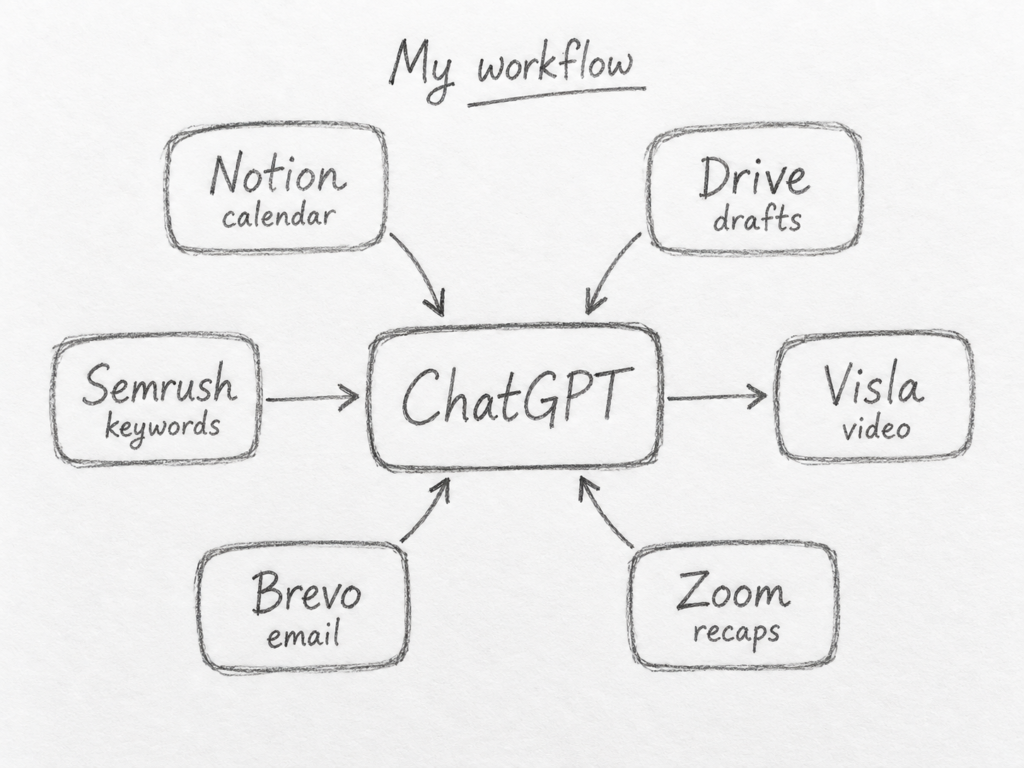
We’re not here to talk about the technical side of things, though. I’m going to be talking about my own marketing workflow and the plugins I use weekly to support it. For example, my team’s content calendar lives in Notion. My blog drafts, webpage drafts, and video scripts live in Google Drive. I use Semrush for keyword research, Zoom for meeting recaps, Brevo for email marketing, and Visla for video production. Now, I can bring all of that data, information, and content into ChatGPT through their associated plugins.
The best ChatGPT Plugins for marketers
| Plugin | Best for | Why I recommend it |
|---|---|---|
| Google Drive | Content and file access | Bring existing drafts, scripts, and documents into ChatGPT |
| Notion | Content calendars and planning | Work directly from your editorial calendar and project information |
| Semrush | SEO research | Check rankings, keywords, and competitor data |
| Zoom | Meeting analysis | Turn AI meeting recaps into cleaner, more useful notes |
| Brevo | Email marketing | Pull campaign statistics into ChatGPT, analyze performance, and create drafts |
| Visla | Video marketing | Turn ideas and scripts from ChatGPT into complete videos |
1. Google Drive
Best for: Bringing your existing marketing work into ChatGPT
I use the Google Drive Plugin for ChatGPT constantly because that’s where most of my finished work lives.
My blog drafts, webpage copy, video scripts, and other content all end up in Drive. Connecting it to ChatGPT means I can search for an old article, compare several drafts, pull information from a document, or use previous work as context without downloading and uploading files every time.
That’s particularly useful when I’m updating something I’ve written before. Instead of trying to remember how we described a feature six months ago, I can find the finished draft in Drive and work from that.
Google has also consolidated its Docs, Sheets, and Slides integrations under Google Drive, so one connection covers much of the Google Workspace content a marketing team (like mine!) might want to reference.
If most of your company’s writing and documentation already lives in Drive, this is a pretty natural place to start.
2. Notion
Best for: Content calendars and marketing operations
Our content calendar lives in Notion, so the Notion Plugin is another one I use for real work.
I can ask ChatGPT what’s coming up, pull information from an upcoming content project, or check how full the editorial calendar looks.
I also use Notion alongside ChatGPT Tasks. I have ChatGPT remind me about upcoming blog posts and alert me if the calendar starts looking empty two weeks into the future. That turns Notion from something I have to remember to check into something ChatGPT can actively help me keep an eye on.
For me, the relationship between Notion and Google Drive is pretty simple. Notion tells me what we’re planning. Drive contains most of the finished writing.
3. Semrush
Best for: SEO and keyword research
The Semrush Plugin lets ChatGPT work with current Semrush SEO and traffic data instead of guessing at rankings, search volume, keyword difficulty, or competitor performance.
I mainly use it for two things.
First, I track keywords Visla already ranks for so I can see where we’re gaining or losing ground. Second, I research keywords we might want to target with future articles.
That works well inside ChatGPT because I can move directly from the data into content planning. I might look at a keyword we’re sitting around position 12 for, compare the competing pages, then decide whether an update to an existing article or a new piece makes more sense.
Semrush supplies the SEO data. ChatGPT helps me work through what to do with it.
4. Zoom
Best for: Cleaning up meeting recaps
Zoom already has AI-generated meeting summaries, so using another AI to summarize the AI summary sounds slightly ridiculous.
I still do it.
The Zoom Plugin gives ChatGPT access to meeting summaries, transcripts, recordings, decisions, and other meeting information. I mostly use it to turn Zoom’s raw recap into something cleaner and more useful.
For example, I can ask ChatGPT to separate actual decisions from general discussion, pull out the items that affect my content work, or rewrite the recap around what I personally need to do next.
If someone mentions a product change during a meeting and I need it for an article later, I can also go back and find the relevant discussion.
Zoom does the first pass. ChatGPT makes the result easier to use.
5. Brevo
Best for: Email marketing analytics and campaign drafting
The Brevo Plugin for ChatGPT is one I’ve been waiting for.
I use Brevo for Visla’s marketing emails, and being able to pull campaign performance directly into ChatGPT saves me an enormous amount of time. Instead of opening individual reports or exporting statistics, I can ask ChatGPT for whatever metrics I need.
For example, I can pull the open and click rates for my last ten campaigns, compare their performance, examine A/B test results, or retrieve information about specific contact lists and audience segments. Then I can analyze everything in ChatGPT, look for patterns, and figure out which campaigns deserve a closer look.
The Plugin can also create email campaigns, SMS campaigns, and email templates, saving them as drafts directly in Brevo. You’ll still need to review and send your campaigns from Brevo itself, but the reporting capabilities alone make this one of my favorite Plugins.
6. Visla
Best for: Turning marketing ideas into videos
The Visla Video Maker plugin connects the writing and planning I do in ChatGPT to the video production I do in Visla.
Instead of a long back-and-forth, Visla walks you through a guided process where you shape an idea into a script and then into a video project.
Once the video is generated, you can open the project in the Scene-Based Editor. There, you can further refine and tinker with your draft.
This is especially useful for blog content. Once an article is finished, I can reuse the same research and argument to make a shorter video without starting over.
How I actually use ChatGPT Plugins for content marketing
My setup isn’t especially complicated.
Our content calendar lives in Notion. I use ChatGPT Tasks with that calendar so I know what’s coming up and get warned if we’re starting to run short on planned content.
Semrush handles keyword and ranking data. Most of my research, outlining, and analysis happens in ChatGPT.
I also analyze campaign data using the Brevo plugin, so I can make informed decisions about what’s working, what’s not, and how to refine future email campaigns.
My finished blog drafts, webpage drafts, and scripts go into Google Drive. If I need information from a meeting, Zoom gives ChatGPT access to the recap and transcript so I can clean them up or pull out what matters.
When I need a video, I use Visla.
That’s basically my stack.
ChatGPT Plugins worth watching for marketers
Some Plugins are more specialized, but I’d keep an eye on these.
Conductor
The Conductor Plugin is interesting for SEO and content teams working on AI search visibility.
It can track brand mentions, citations, sentiment, topics, and competitive visibility across AI results. If part of your job involves figuring out whether AI systems actually mention your company when people research your category, this is worth investigating.
Amplitude
The Amplitude Plugin makes more sense for growth and product marketers.
It lets ChatGPT query behavioral data such as funnels, retention, experiments, and user activity directly from an Amplitude workspace.
Airtable
The Airtable Plugin can query bases and create or update structured records.
If your team’s content calendar, campaign planning, influencer database, or marketing operations already run on Airtable, that’s useful. I personally use Notion for that job, so I wouldn’t need both.
Clay
The Clay Plugin is geared toward B2B research, prospecting, and personalized outreach.
It can research companies, enrich contacts, and use current account information to support outbound work. I’d look much harder at this one if my job involved demand generation or account-based marketing.
Marketing Plugins I wish existed
There are still a few integrations I badly want.
A better LinkedIn Plugin
The current LinkedIn integration isn’t what I want from LinkedIn inside ChatGPT.
I want access to my own posts and analytics. Let me ask which posts performed best, compare topics and formats, track impressions and engagement, find patterns, draft a follow-up, and eventually publish it after I approve it.
LinkedIn already exposes member post analytics through its API, including metrics for individual and aggregated posts. Its APIs also support creating and retrieving posts, although some of that access is restricted.
LinkedIn has also since added a separate LinkedIn Ads Plugin that can analyze ad-set performance, which is useful if you run paid campaigns. However, this is beta and read-only.
There are already third-party tools, such as Postbeam, trying to fill this gap. But I’d still love a first-party LinkedIn Plugin that lets me analyze my own posts, compare engagement and reach, find patterns, and handle publishing without adding another platform to my stack.
Google Keep
I use notes for the kind of ideas that aren’t developed enough to deserve their own document yet.
A Google Keep Plugin could let me ask ChatGPT to find every random note I’ve written about a topic, group them together, and turn the useful parts into an outline.
Google already has a Google Keep API, although it’s currently more limited and enterprise-focused than something like Drive.
I’d still love to have those notes available as another source of context.
A Figma Plugin I can consistently trust
Figma already has AI integrations. I want one that reliably produces something I’d actually keep.
The basic idea is good. Give ChatGPT access to a real Figma design system, let it work with editable frames and components, and make changes directly to the canvas.
The current Figma Plugin can generate editable Figma and FigJam assets, including designs, slides, and diagrams. That is much closer to the workflow I want.
The problem is still the translation from “I know what I want” to “yes, that’s actually what I meant.”
How to use ChatGPT Plugins safely
Plugins can read real company information and, in some cases, modify things in outside services. Check what you’re giving them access to.
The Plugin Directory shows connection requirements, included Apps, terms, privacy policies, and available actions. Permissions from the original platform still apply. Connecting Google Drive doesn’t give you access to files your Google account couldn’t already open.
Be very careful with write access. Review each App’s permissions and choose how much autonomy you want to give it. If you want ChatGPT to ask before making changes, select a permission setting that requires approval for write actions. Some settings allow low-risk changes without another confirmation, so don’t assume every edit or saved draft will require your approval.
Third-party Apps also have their own privacy policies and data practices. OpenAI’s rules don’t automatically become the third party’s rules.
For Business, Enterprise, and Edu workspaces, OpenAI says connected App data isn’t used to train its generalized models by default. Consumer accounts have separate Data Controls, including the “Improve the model for everyone” setting.
How to install a ChatGPT Plugin in 2026
- Open the Plugin Directory in ChatGPT.
- Search for the Plugin you want.
- Review what it can access and what actions it can take.
- Connect any required outside account.
- Add the Plugin to a conversation when you want to use it. ChatGPT is also intelligent enough to use a plugin if a conversation requires it.
You can generally call a connected Plugin with an @ mention or through + → More, depending on the Plugin and ChatGPT surface you’re using. Availability varies by plan, workspace settings, region, and the Plugin itself.
For the full explanation of Apps, skills, templates, permissions, and installation, read our guide to ChatGPT Plugins in 2026.
Which ChatGPT Plugins should marketers install?
You don’t need many. Start with the ones that connect ChatGPT to work you’re already doing, then add another when it solves a problem you actually have.
That’s worked pretty well for me.
FAQ
Yes. ChatGPT can work with multiple connected apps in the same prompt when those apps and capabilities are available to your account or workspace. That means a workflow could pull planning information from Notion, reference a document in Google Drive, and use another connected source for data without treating every Plugin as an isolated tool. OpenAI also allows individual Plugins to package multiple apps and skills together for a specific workflow. You can learn more about how those pieces fit together in OpenAI’s current Plugin documentation.
Yes. The easiest place to start is OpenAI’s Plugin Creator: install it from the Plugin Directory, start a chat with @plugin-creator, and describe the workflow you want to build. Your Plugin can combine reusable instructions with connected apps, so a marketing team could create something around its own reporting process, campaign templates, content workflows, or internal tools. If you need to connect ChatGPT to a proprietary service or backend that isn’t already available, you can go further by adding a custom app built with MCP. OpenAI’s Plugin documentation explains the available options and workspace controls.
Some can, but it depends on the Plugin, the connected App, and your permissions. Apps may support write actions such as creating or updating information in another service, while others are read-only. ChatGPT can require approval before external actions, but permission settings can also allow certain low-risk or supported actions to run without another confirmation. Workspace administrators can further restrict which actions are available.

May Horiuchi
May is a Content Specialist and AI Expert for Visla. She is an in-house expert on anything Visla and loves testing out different AI tools to figure out which ones are actually helpful and useful for content creators, businesses, and organizations.