
Quick Answer: How to actually make a holiday party recap video
To make a holiday party recap video people actually watch, plan your “must-capture” moments, film short clips with steady framing and clear audio, then edit around a simple beginning-middle-end story. Aim for one main recap cut for your team, plus a shorter teaser if you’ll post publicly. Add captions, keep the pacing snappy, and share it while the event still feels fresh.
Want to capture your holiday party?

A good recap video does something photos can’t: it replays the vibe. You get the laughter, the toasts, the hallway jokes, the tiny moments that make your team feel like a team.
It also helps in a very practical way. When you share a recap internally, you boost connection for people who couldn’t attend, and you give everyone a quick “that was fun” memory they can revisit during the inevitable January grind.
If you share externally, you can show culture without writing a long post about culture. Just keep it honest and respectful, and make sure the people in the video feel good about how you used the footage.
What makes a good holiday recap video?
A great recap video does three simple things:
- Shows the energy of the party: The video should feel like the party. Was it fancy and classy? Was it loud and goofy? Make sure that vibe comes through in the footage, music, and editing style.
- Tells a story: Every good video has a beginning, middle, and end. Start with setting up the party, then show the action, and wrap it up with a happy ending. Even a short video should have some flow so it’s fun and easy to watch.
- Feels real: The best videos don’t look staged. The little moments, like laughter, dancing, or people having fun, make your video feel personal and genuine.
When you get these three things right, your video will connect with viewers and leave them smiling.
Consent and comfort: don’t skip this at a work event!
At a company party, people expect fun, not surprise publicity.
Here’s a simple, low-friction approach:
- Tell people you’re filming. A quick sign at check-in plus a heads-up in the invite covers most situations.
- Offer an easy opt-out. You can do a sticker, wristband, or a “tell the camera person” note.
- Avoid filming anyone who looks uncomfortable. Don’t debate it, just move on.
- Get written permission for anything truly promotional. If you plan to use the recap in ads or recruiting campaigns, treat it like a real production and use releases.
This isn’t about being paranoid. It’s about keeping trust intact.
Understand what you want to make before you throw your party
If you only make one decision before the party, make this one: what are you creating, and where will it live? That choice controls everything else, from how you film to how you edit.
Here’s a simple way to decide.
| Deliverable | Best for | Target length | What it should feel like |
|---|---|---|---|
| Internal recap (the “main cut”) | Team morale + inclusive recap | 60 to 120 seconds | Warm, fun, and complete |
| Social teaser (optional) | Recruiting + brand presence | 15 to 30 seconds | Fast, punchy, and headline-y |
| Photo montage (optional) | If you have more photos than video | 20 to 45 seconds | Simple, clean, and nostalgic |
Pro move for 2025: plan to export both a vertical version and a horizontal version. You’ll thank yourself later when someone asks for “one for LinkedIn” and “one for Reels.”
How to make a holiday party recap video
1. Plan Ahead
Before the party starts, make a list of what you want to capture. Are there important moments you can’t miss? For example, maybe your boss is giving a speech, or there’s a big gift exchange. Think about the highlights and write them down so you don’t forget.
You can also plan shots for specific parts of the event. For example, maybe you want to capture the decorations before guests arrive or get shots of people arriving in their best party outfits. Being prepared makes it much easier to get the footage you need.
It also helps to know who’s going to see the video. Is it just for your team, or will you share it online? Knowing your audience will help you decide what to focus on and how to edit later.
2. Capture High-Quality Footage
If you want your video to look good, you need clear and steady shots. Use a good camera or even a smartphone with a nice camera. A tripod or stabilizer will keep your video from looking shaky. Clean, smooth footage makes a big difference in how professional and enjoyable your video looks.
Tools like Visla’s Video Recording features make it super easy to record your footage. You can store everything in one spot and start editing right away.
Pro Tip: Use a mix of shots. Get wide shots of the whole party, close-ups of people having fun, and fun angles of decorations, food, or activities. Don’t forget to capture people’s reactions—those genuine smiles, laughs, and cheers are gold for your video.
3. Add Behind-the-Scenes Moments
Some of the best moments happen when no one knows you’re filming. Maybe it’s people laughing during setup, someone sneaking a taste of the snacks, or a funny moment that wasn’t planned. These behind-the-scenes clips make your video feel fun, natural, and real.
With Visla’s tools, it’s easy to record these candid moments, so keep your camera ready! Sometimes the unplanned moments end up being everyone’s favorite part of the video.
4. Keep It Short and Sweet
No one wants to watch a super long video. Keep your recap between 1 and 3 minutes. That’s plenty of time to show off the highlights without losing people’s attention. If you’re sharing your video online, a short and snappy video will also get more views.
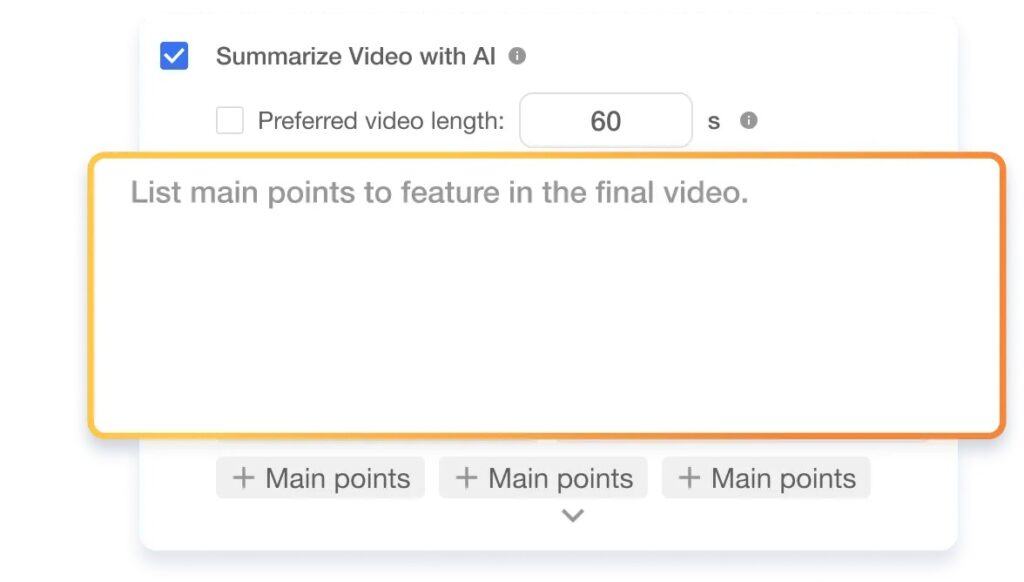
Visla has tools like AI Summary and AutoCut that help you shorten your video. They find the best clips for you so you don’t have to watch everything over and over. If you like to edit yourself, Visla’s Scene-Based Video Editor gives you all the control you need to make the video just right.
5. Add Music and Text
Music makes a big difference. A fun, upbeat song will make your video feel exciting, while a softer song can make it feel warm and nostalgic. Visla’s AI-Suggested Background Music helps you find the perfect soundtrack fast.

You can also add text to your video to make it more engaging and clear. Use text to show who’s speaking, explain what’s happening, or highlight funny or important moments. With Visla’s Scene-Based Editor, adding text is super simple, and you can make it look just right.
Pro Tip: If your party had any inside jokes or funny moments, you can use text or captions to point those out. It’s a small touch that makes your video even more personal and fun for viewers.
Bonus Tip: Share It!
Once your video is ready, share it! Post it on your company’s social media, send it in an email to your team, or even show it at the next meeting. The more people who see it, the more fun it will be. A recap video isn’t just for the people who were at the party, it’s also a great way to share your team’s joy and personality with others.
| Where you’ll share | Aspect ratio | What to post | Notes |
|---|---|---|---|
| Internal Slack or Teams | 16:9 or 1:1 | Full recap | Add captions for silent viewing |
| 1:1 or 16:9 | Full recap or a 30 to 45 second cut | Keep it professional, not stiff | |
| Instagram Reels | 9:16 | Teaser or full recap | Reels now allow up to 3 minutes |
| TikTok | 9:16 | Teaser | TikTok has long supported longer videos, but short cuts still work well for recaps |
| 9:16 or 16:9 | Teaser or full recap | New uploads default to Reels |
You can even use it to promote future events. Seeing how much fun everyone had this year can get people excited for next year’s party!
FAQ
For an internal team recap, aim for 60 to 120 seconds so it feels complete without dragging. For social media, cut a separate 15 to 30 second teaser that highlights the funniest or most energetic moments. If you want one video to do both jobs, keep it closer to 60 seconds and add captions.
You need a mix of establishing shots, people moments, details, and one or two “big moments” like a toast or award. Short, steady clips with clean audio will beat fancy transitions every time. Film a little extra ambient sound so your edit doesn’t feel choppy
Edit in three passes: select your best clips, arrange them into a simple beginning-middle-end, then polish with captions and music. Tools that auto-remove bad takes and generate a tighter summary can save a lot of time when you have tons of footage. Scene-based editing also helps because you can reorder chunks without getting lost in a timeline.
If you’re posting publicly for a business, treat music as a licensing question, not a vibes question. A track being available in an app doesn’t automatically mean you have commercial rights to use it, and credit alone doesn’t replace a license. When in doubt, use properly licensed, brand-safe music.
Tell people you’re filming and give them an easy opt-out so nobody feels cornered. Avoid lingering close-ups of anyone who looks uncomfortable, and don’t post anything that could embarrass someone later. If you plan to use the video for recruiting or ads, use written releases and follow your company’s policies.

May Horiuchi
May is a Content Specialist and AI Expert for Visla. She is an in-house expert on anything Visla and loves testing out different AI tools to figure out which ones are actually helpful and useful for content creators, businesses, and organizations.