

Visla for Google Workspace
Create videos directly from your Google Docs with Visla AI Video. Use your document text as the starting point, then customize the video with AI voices, avatars, and script settings before generating your project.
What does the Visla Google Workspace add-on do?
The Visla AI Video add-on helps you turn Google Docs into shareable videos without leaving your document. It reads your doc text, lets you configure your video settings, and generates a video project you can review, edit, and share.


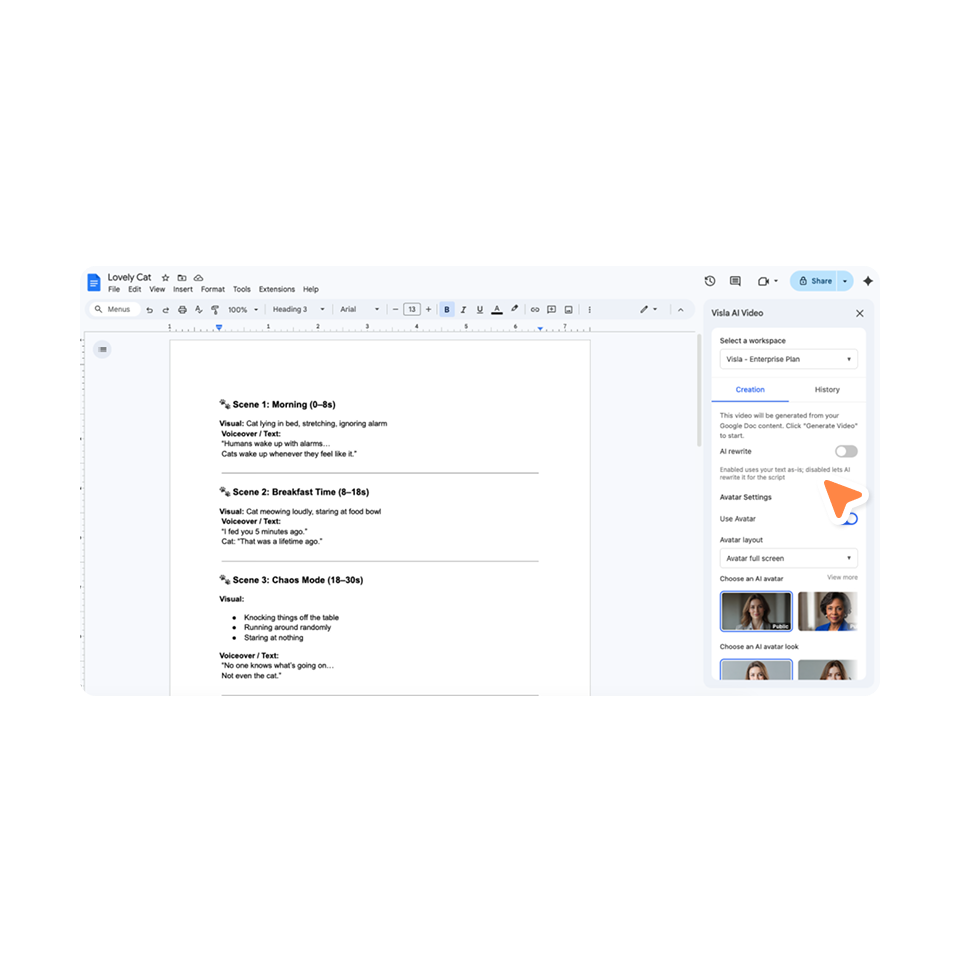
How it works
2. Install Visla AI Video>
Go to Extensions > Add-ons > Get add-ons, then search for Visla AI Video in the Google Workspace Marketplace.
3. Open the add-on>
After installation, go back to Extensions, select Visla AI Video, and open the side panel. Log in or sign up.
4. Choose your video settings>
Use the Creation panel to choose settings like avatar, voice, and script options.
5. Generate and edit your video>
Create your video, then open it in Visla to view, edit, or continue working on the project.
What you can do with Visla in Google Docs
Turn a document into video
Use the content in your Google Doc as the foundation for a complete AI-generated video.
Choose avatars and voices
Customize how your video is presented with avatar and voice options before generation.
Keep or rewrite your script
Keep your original text as-is, or turn on AI script rewriting to optimize the script for video.
Review past projects
Use the History panel to find previously generated clips and open related projects.
Who it’s for
Training and L&D teams

Turn onboarding docs, SOPs, and training materials into videos employees can watch and revisit.
Educators

Convert lesson notes, handouts, or explanations into more engaging video content.
Marketing teams

Repurpose written drafts, campaign notes, or product copy into quick video assets.
Scalable internal video creation

Transform announcements, updates, and policy documents into easier-to-watch videos.
Frequently Asked Questions
 What is the Visla Google Workspace add-on?
- How do I install Visla AI Video?
- Do I need a Visla account?
- Can Visla rewrite my Google Doc text for video?
- Can I edit the video after it’s generated?