

Visla AI Video for Google Chrome
Create videos from any webpage with the Visla AI Video Chrome extension. Use a full page or highlight specific text and images, then generate an AI-powered video with customizable avatars, voices, layouts, subtitles, and more.

What does the Visla AI Video Chrome extension do?
The Visla AI Video Chrome extension helps you turn web content into videos directly from your browser. You can create a video from an entire webpage or highlight only the section you want to use.


How it works
2. Open the extension>
Click the Visla icon in your Chrome extension menu.
3. Choose what to turn into a video>
Create a video from the full webpage, or highlight specific text and images to generate a video from only that selection.
4. Customize your video>
Choose settings like avatar, voice, layout, aspect ratio, pace, subtitles, and other video options.
5. Generate and review>
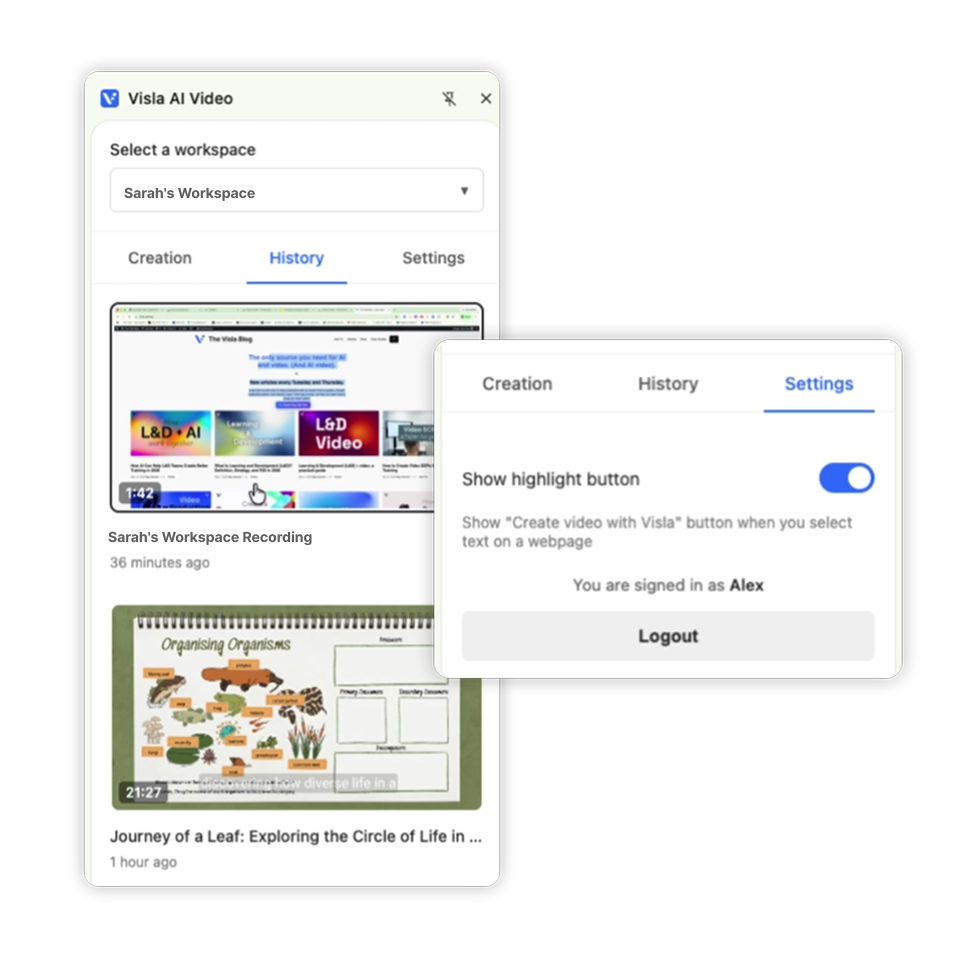
Create your video, then use the History tab to find previous clips and continue working.
What you can do with Visla in Chrome
Turn webpages into videos
Use page text and images as the starting point for an AI-generated video.
Create videos from selected content
Highlight the exact text or images you want, then generate a focused video from that selection.
Customize avatars and voices
Choose avatar and voice settings before generating your video.
Use webpage images automatically
Visla can include images from the page to help create richer video content.
Who it’s for
Marketing teams

Repurpose blogs, landing pages, and campaign pages into quick video drafts.
Educators

Turn articles, lesson pages, and online resources into video explainers.
Training and L&D teams

Create videos from process pages, help docs, SOPs, or internal resources.
Content creators

Convert online ideas, references, and research into social-ready video content faster.
Frequently Asked Questions
 What is the Visla AI Video Chrome extension?
- Do I need a Visla account?
- Can I create a video from only part of a webpage?
- Can I turn off the highlight button?
- Can I access videos I created earlier?